
OpenTable
OpenTableFood & Drink
4.755.25K Reviews
- Version
- 26.27.1
- Installs
- 10.00M
- Age Rating
- Everyone
Screenshots

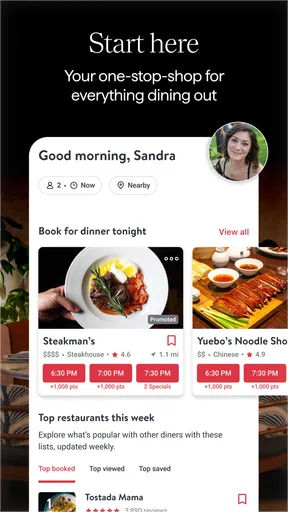
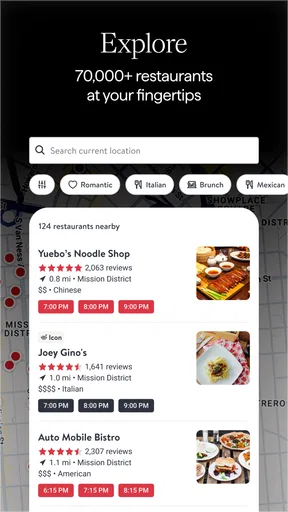
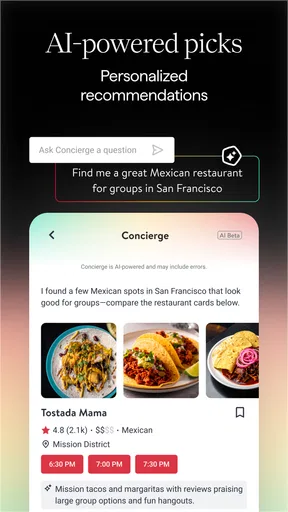
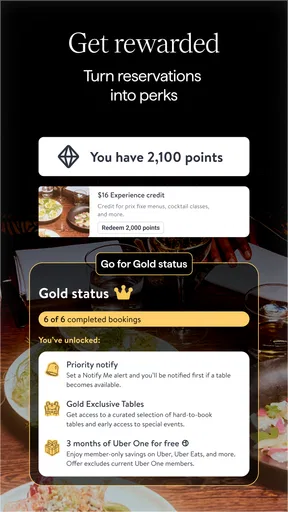
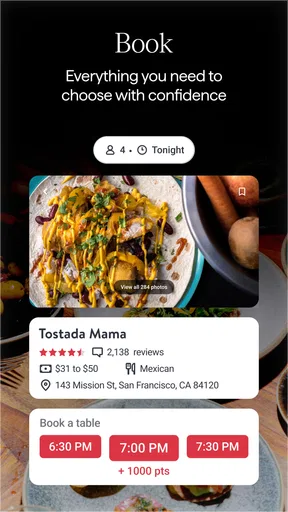
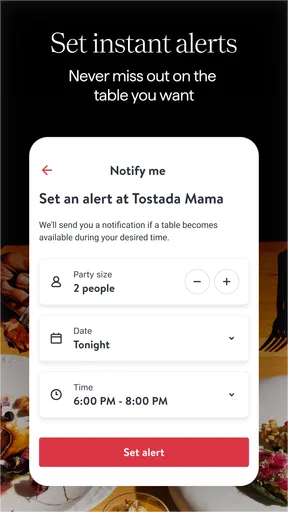
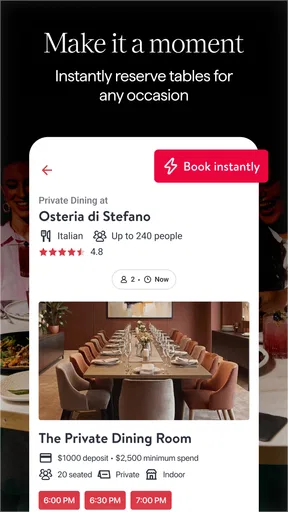
Our Review of OpenTable
 Analysis by Appyee
When I need to turn “we should go out for dinner” into an actual plan, I usually want fewer open tabs, fewer messages, and less guessing about whether a restaurant can take us. That is where OpenTable makes sense. It is a free Food & Drink app from OpenTable that focuses on finding restaurants and making a reservation for a particular occasion. I found it most useful when the decision had a time attached to it, rather than when I was simply browsing for cooking inspiration or looking for a takeaway.
The app has the scale you would expect from a well-established restaurant booking service. It has an average rating of 4.6 from around 193 thousand ratings, more than 10 million installs, and an Everyone age rating. Those figures do not automatically make every search perfect, but they do tell me that this is a mainstream tool rather than a niche directory. The current version is 26.22.0, and it runs on Android 8.0 or later.
From a vague dinner idea to a confirmed table
I find the biggest benefit of OpenTable is how it turns a loose idea into a booking search with real constraints: where, when, and how many people. Before choosing a restaurant, I’d decide which of those details can flex; that makes comparisons more useful and keeps an available slot from becoming the only reason to book. Next, I look at how the search holds up when several people and competing preferences are involved.
Starting with the real problem
My most practical test is a familiar one: I am meeting friends after work, we have a rough area in mind, and nobody wants to be the person who calls several restaurants one by one. With OpenTable, I can begin by thinking about the occasion instead of the restaurant name. That distinction matters. If I already know exactly where I want to eat, a direct search or the restaurant’s own app may be quicker. If I only know the neighborhood, meal, and approximate timing, a reservation-focused service is more helpful.
I would first narrow the search around the place and time that actually work for the group. This avoids a common mistake with restaurant discovery apps: choosing a beautiful-looking venue before checking whether it fits the evening. A restaurant can be appealing, but if the available time is too early, too late, or inconveniently far away, it is not a useful result. I prefer to treat the booking requirement as the first filter and the menu or atmosphere as the second.
This is also where I would check the party details carefully. A table for two is not the same problem as a family meal, a birthday gathering, or a last-minute meeting. The number of guests affects which options are practical, and larger groups often need more patience because the most convenient slots disappear first. OpenTable helps me turn that vague social plan into a specific search, which is its strongest starting point.
Reading results without rushing the choice
The search stage is not just about tapping the first available time. I use it to compare the restaurants that can realistically fit the plan. I look at the location, the available booking time, and whether the restaurant feels appropriate for the occasion. A quiet meal with a client, a casual catch-up, and a celebration may all require different choices even when they happen in the same neighborhood.
One useful habit is to search more broadly than the exact restaurant I first had in mind. A familiar name may be fully booked, while a nearby alternative has a better time and a setting that suits the group more closely. This is a subtle advantage over relying only on a map app: the point is not merely to see restaurants around me, but to connect the discovery step with a reservation opportunity.
At the same time, I do not treat the app as a complete substitute for judgment. Photos and descriptions can help me form an expectation, but they cannot fully show noise levels, table spacing, service pace, or how comfortable a place is for a particular group. I use OpenTable to reduce the search area and secure a possibility, then I make the final decision with the occasion in mind.
Choosing a time that survives real life
Availability can look attractive until I consider the journey. For a weekday booking, I would leave room for work finishing late, traffic, parking, or a delayed train. The earliest available slot is not necessarily the best slot. A slightly later reservation that gives everyone a realistic chance of arriving is often more useful than a theoretically perfect time that creates stress.
This is one of the app’s practical strengths: it makes the time decision visible early. Traditional restaurant discovery often separates “where should we eat?” from “can we get a table?” OpenTable brings those questions together. That can prevent a frustrating handoff from a group chat to a phone call, followed by another message explaining that the original plan is impossible.
For a spontaneous meal, I would search close to the current time and keep the area flexible. For a planned occasion, I would start with the date and party size, then compare the available options. These are different workflows, and the app is more valuable when I use it as a scheduling tool rather than as an endless restaurant catalogue.
Making the reservation
Once I have found a suitable restaurant and time, the booking step should be treated as a commitment, not just a bookmark. I check the date, time, location, and party size before completing it. That final pause is worthwhile because a wrong date or an accidental selection for the wrong number of guests can create avoidable trouble for both the diner and the restaurant.
I also make a note of the practical details that matter to the group. If someone has a dietary concern, mobility requirement, or another request, I would not assume that selecting a table automatically solves it. A reservation records the booking, but it does not guarantee that every preference can be accommodated. When a request is important, contacting the restaurant directly can still be the safer handoff.
This is an important difference between reservation convenience and personal communication. OpenTable can help me secure the basic appointment, but it cannot replace a conversation when the situation is unusual. For a standard dinner, that is rarely a problem. For a large celebration or a strict dietary need, I would use the app as the first step and confirm the sensitive details separately.
Passing the plan to everyone else
A reservation is only useful if the other people know what has been arranged. In a real group, the handoff usually happens through a message: restaurant name, address, date, time, and guest count. I prefer to send those details immediately after booking instead of assuming everyone remembers the earlier discussion. This is where a small amount of discipline prevents the familiar “I thought we were meeting somewhere else” problem.
The app reduces the work of finding and reserving the table, but the group communication remains my responsibility. That is not a flaw unique to OpenTable; it is simply the boundary between a booking service and a messaging app. Still, it is worth understanding because a smooth reservation can become a messy evening if nobody shares the final plan.
For a family meal, I would also tell the group what time we need to leave, not only the reservation time. For a work dinner, I would share the exact venue rather than just the restaurant name, especially if the business has multiple locations. These small handoffs are more important than spending another ten minutes comparing similar listings.
What happens after the booking
The result I want is straightforward: a suitable restaurant, a workable time, and a clear plan that the group can follow. OpenTable is good at bringing those pieces together in one restaurant-focused workflow. It is especially convenient when I am balancing availability with occasion, location, and party size instead of choosing purely on personal preference.
For a last-minute dinner, the value is speed. I can look for realistic options without calling several places. For a planned celebration, the value is organization. I can begin with the date and group size, compare what is possible, and then pass a concrete choice to everyone else. For visitors in an unfamiliar area, it can also be more useful than relying only on restaurants I already know.
There is a psychological benefit too: once the table is arranged, the group can stop debating the basic logistics. That does not guarantee a memorable meal, but it moves the evening from uncertainty to something actionable. In my experience, that is the app’s real job, and it performs that job better than a general restaurant map when a reservation is central to the plan.
Where the workflow breaks down
The first weak point is coverage and availability from the user’s perspective. A restaurant may not appear as the best option for a particular search, or the convenient times may already be gone. When that happens, the app cannot manufacture a table. I may need to widen the area, change the time, consider another restaurant, or contact the venue directly. OpenTable is a useful access point, not a guarantee that every restaurant or every desired slot will be available.
The second issue is that availability can encourage overly quick decisions. A free time may look like an opportunity, but it can also push me toward a restaurant that is merely convenient rather than genuinely suitable. I try to resist booking based on the clock alone. I still consider the occasion, travel distance, and the needs of the people joining me.
The third limitation is the gap between a reservation and the full dining experience. The app can help arrange the table, but it cannot make the restaurant quiet, ensure the meal matches my expectations, or resolve every special request. Readers who want detailed cooking guidance, grocery planning, delivery ordering, or a broad social food community may find a different kind of app more appropriate. OpenTable is specialized around restaurant discovery and booking, and its focus is both its advantage and its boundary.
I also would not choose it as my only tool for a complicated event without additional checking. A birthday dinner with a large party, a strict seating requirement, or an important business meeting deserves direct confirmation of the details that matter most. The app can start that process efficiently, but personal contact may be better when a mistake would be costly.
How it compares with the usual alternatives
A map app is often better when I care mainly about distance, directions, opening hours, or seeing what is physically nearby. It can show a wider range of places, including businesses that are not part of the same reservation workflow. However, I may have to move between the map, a restaurant website, a phone call, and a calendar before the plan is complete. OpenTable is more focused: it makes the booking question part of the search from the beginning.
Calling the restaurant directly is better for nuanced questions. I would choose that route for accessibility details, unusual dietary requirements, a large group, or anything that needs a human answer. The trade-off is time and convenience. OpenTable is faster for ordinary bookings, while a phone call can be more dependable for exceptions.
Restaurant-owned apps and websites may be preferable when I am loyal to one venue or want to interact directly with that business. They can feel more appropriate for repeat visits, but they are less convenient when I am comparing several restaurants in one area. OpenTable is strongest in that comparison stage, where I want to move from a broad choice to a specific reservation without repeating the same process across multiple sites.
Finally, a food review or social discovery platform may be more enjoyable for inspiration. Those services can be useful when I have no occasion, no date, and no clear destination in mind. I would choose OpenTable when inspiration needs to become a timed plan. That distinction helps prevent disappointment: this is not primarily a recipe app, a delivery service, or a replacement for a full restaurant review community.
Who will get the most from it
I would recommend OpenTable to people who regularly arrange dinners, travel to unfamiliar places, or coordinate plans for more than one person. It works particularly well for anyone who dislikes phone calls but still wants a confirmed restaurant booking. It is also useful for people who begin with constraints such as a date, time, area, and group size rather than a fixed restaurant name.
It suits busy workers who need to settle an evening quickly, couples planning a meal, and friends trying to avoid a long group-chat debate. The free price makes it easy to try without adding another purchase decision, and the Everyone rating makes it broadly accessible as a general dining tool.
I would be more cautious about recommending it to someone who always eats at the same restaurant, prefers to speak directly with staff, or needs extensive personal arrangements for every booking. That person may find a direct call or the restaurant’s own channel more efficient. I would also skip it as a primary choice if my main goal were recipes, food delivery, supermarket shopping, or detailed culinary education.
Small habits that make the app more useful
My first tip is to decide the non-negotiables before searching. If the group must finish by a certain time, if the area cannot change, or if the occasion requires a particular atmosphere, I would define that first. Otherwise, the number of available choices can create more indecision instead of less.
My second tip is to search with a little flexibility, but not unlimited flexibility. Moving the time slightly or checking a nearby area can reveal a much better option. Changing everything at once, however, makes it hard to understand why a restaurant was chosen. I prefer to adjust one constraint at a time so the final decision remains explainable to the group.
My third tip is to treat the confirmation as a handoff checkpoint. After booking, I would verify the details, send them to the guests, and flag any request that needs direct confirmation. This simple sequence catches errors before the meal rather than at the restaurant door.
My fourth tip is to use the app for the part it handles best and another source for the part it does not. OpenTable can organize the reservation decision; a map can help judge the route; the restaurant can answer special questions. Trying to force one app to solve every part of the evening is less effective than giving each tool a clear job.
My final take
After using OpenTable as a complete planning workflow, I see it as a practical bridge between restaurant discovery and a confirmed booking. It is not trying to be every kind of food app, and that narrow purpose is helpful. When I have a real date, a real group, and a real need to secure a table, it removes several awkward steps from the process.
The experience is best when the booking is ordinary and the main challenge is finding a workable restaurant and time. It becomes less complete when I need detailed local knowledge, a special arrangement, or a direct conversation with staff. Those limits do not cancel out its usefulness; they simply show where the handoff to another tool or the restaurant itself should happen.
With its free access, broad adoption, and straightforward focus, I think OpenTable is worth keeping on an Android device for anyone who eats out often or organizes meals for others. My recommendation is to use it decisively: search around the actual occasion, check the practical details, reserve only when the plan fits, and share the result immediately. The best reason to install it is not endless restaurant browsing; it is turning an uncertain dinner idea into a plan people can actually follow.
Privacy and Permissions
See what permissions an app requests and how it handles your data.
- Identity
- find accounts on the device, add or remove accounts
- Contacts
- find accounts on the device
- Location
- approximate location (network-based), precise location (GPS and network-based)
- Camera
- take pictures and videos
- Wi-Fi connection information
- view Wi-Fi connections
- Other
- view network connections, create accounts and set passwords, full network access, run at startup, use accounts on the device, control vibration, prevent device from sleeping, Google Play license check, read Google service configuration
Verdict
Strengths of OpenTable
- Quickly find and reserve tables at nearby restaurants.
- Useful filters for cuisine, price, location, and availability.
- Reservation confirmations and reminders help avoid missed bookings.
- Earn points through eligible bookings and redeem dining rewards.
- Restaurant menus, photos, ratings, and reviews support informed choices.
Limitations of OpenTable
- Popular restaurants can have very limited availability during peak hours.
- Some listings may show outdated menus, prices, or restaurant details.
- Rewards rules and eligible bookings can be confusing for new users.
- Cancellation and no-show policies vary by restaurant and may include fees.
- The app may request location and notification permissions for full functionality.
Similar Picks in This Category
View All
Rappi: Food Delivery, Grocery
Rappi, Inc - Delivery3.5

McDonald’s: Cupons e Delivery
Arcos Dorados4.3

Swiggy: Food Instamart Dineout
Swiggy4.7

Blinkit: Groceries & more
Blinkit4.8

foodpanda: food & groceries
Foodpanda GmbH a subsidiary of Delivery Hero SE4.0

Zomato: Food Delivery & Dining
Zomato4.7
Frequently Asked Questions
What is OpenTable, and what can I use it for?
OpenTable is a restaurant reservation app that helps you discover places to eat, view available tables, and book a time directly from your phone. You can search by location, cuisine, price range, date, and party size. Restaurant profiles commonly include menus, photos, opening hours, ratings, reviews, and details about special dining options or experiences.
Is OpenTable free to download and use?
Yes, OpenTable is generally free to download and use for browsing restaurants and making reservations. In most cases, you do not pay OpenTable a booking fee for a standard reservation, although individual restaurants may apply cancellation fees, no-show charges, deposits, or special-event pricing. Always review the reservation terms shown before confirming your booking.
Do I need an account to make a reservation on OpenTable?
An OpenTable account is normally required to complete and manage reservations, although you may browse restaurant listings without signing in. Creating an account allows the app to save your booking history, contact details, favorite restaurants, and dining preferences. It also makes it easier to modify or cancel reservations and receive confirmations or reminders.
Can I cancel or change a reservation made through OpenTable?
Most reservations can be changed or canceled through the OpenTable app or website, provided you do so before the restaurant’s stated deadline. Open your reservation details and select the available modification or cancellation option. Some restaurants require advance notice and may charge a fee for late cancellations or no-shows, so check the specific policy before booking.
Is OpenTable available everywhere, and are all restaurants listed?
OpenTable is available in many cities and countries, but its coverage depends on the region and on whether restaurants use the platform. Large urban areas usually offer the widest selection, while smaller locations may have fewer listings. The app does not include every restaurant, so it can be useful to compare results with local listings or contact a restaurant directly.
